

Rental Performance Intelligence

It's smart to understand your investment.

A clear view of your rental property's income, expenses and performance. Always within reach.

No credit card required · 14 days of Business free.

All your rental data in one place.

You no longer need to hunt for bookings, payments and expenses across different Excel spreadsheets. Renvia keeps your current rental overview within reach.

Bookings from every platform in one viewReceipts and documents linked to the right propertyCurrent numbers without searching spreadsheets
One clear system

Your rental under control. Income and expenses in one view.

Renvia groups the work into three clear areas, so you can see performance without losing sight of day-to-day operations.

01

See the whole picture

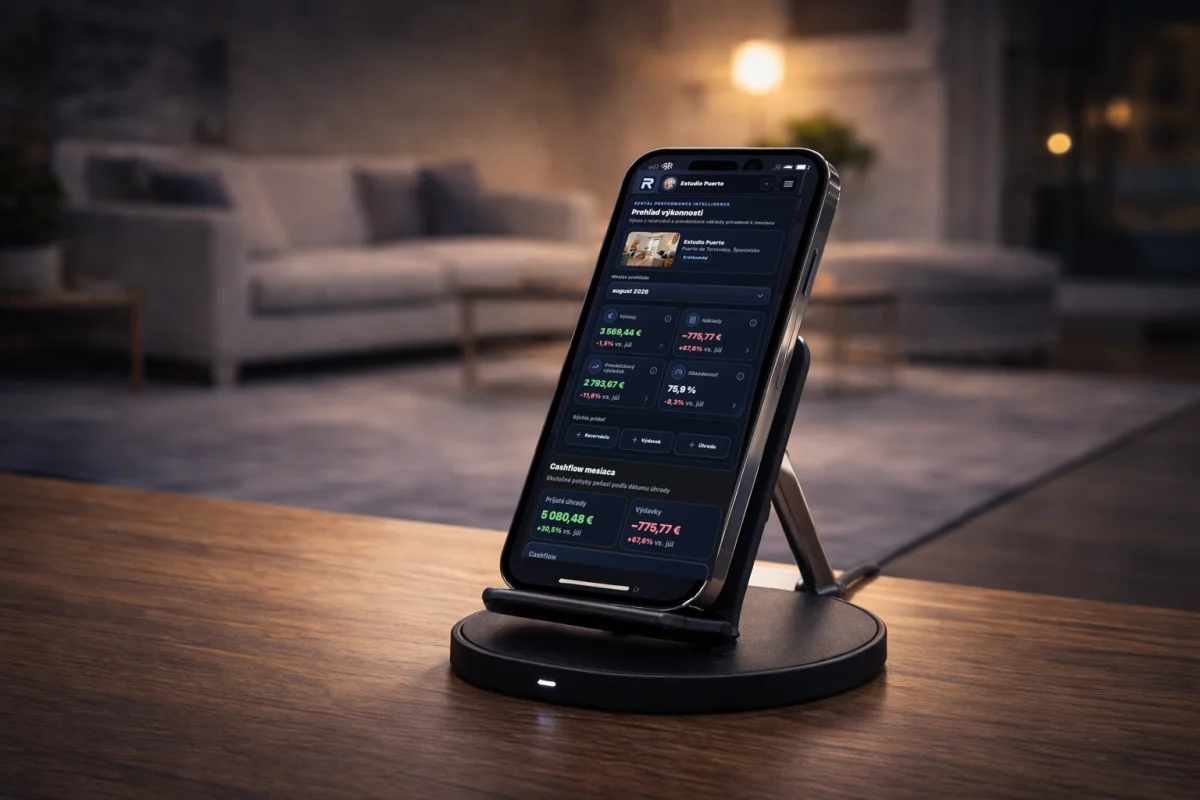
Follow income, costs, cash flow and the value created by every property.

Current-year dashboard

Revenue, costs, operating result and occupancy in one view.

Finances

Complete overview of revenue, expenses and cash flow in one place.

Expense Categorization

Fast, consistent categorization for clear reporting, including refunds and corrections.

Monthly and annual reports

Review revenue, costs, occupancy and results for the selected period.

Asset Value Tracking

Track purchase price, acquisition costs and investments for every property.
02

Stay on top of every rental

Keep reservations, guests, occupancy, payments and pricing in one dependable workflow.

Reservations

Track reservations, guests and payments without spreadsheets.

Smart Occupancy Calendar

Half-day check-in / check-out logic for short-term and long-term rentals.

Short-term & Long-term Rentals

Manage Airbnb properties and long-term rentals in a single system.

Pricelists

Pricelists per platform and year — set different prices for Airbnb, Booking, and more.

03

Keep operations organized from anywhere

Receipts, documents, services and team access stay linked to the right property.

Receipt Scanning (OCR)

Scan a receipt → Renvia creates the expense automatically with category suggestions.

Documents

Store contracts and files securely — always accessible and linked to the right property.

Services and maintenance

Plan services, track their completion and share an operational overview with staff.

How it works

From scattered information to a clear owner view.

Start with one property and build a complete operating and financial history at your own pace.

01

Add your property

Choose short-term or long-term rental and enter the essential property details.

02

Bring rental activity together

Add reservations manually or through calendar feeds, record payments and expenses, and attach receipts and documents.

03

See the real performance

Follow occupancy, cash flow, operating result and portfolio performance from one dashboard.

Why Renvia

Built from first-hand experience managing rental properties.

Renvia started with a simple problem: bookings, expenses, documents and performance were scattered across spreadsheets and separate tools. It was built to give owners one dependable view of every property and the entire portfolio.

Renvia is software for rental property owners and managers.

Simple pricing that grows with your portfolio.

Start with one property and upgrade when you need deeper analytics or team access.

Basic

8.99€ / month
With yearly billing you get
2 months free
Everything you need for one property
  • 1 property
  • Reservations and occupancy calendar
  • Dashboard, finances, expenses and payments for the current year
  • Recurring expenses and monthly rent
  • Pricelists and pricing variants
  • 2 team members with Admin and Staff roles

Pro

17.99€ / month
With yearly billing you get
2 months free
Best for portfolios
Everything from Basic +
  • Up to 5 properties
  • Year-over-year analytics and monthly/annual reports
  • Portfolio performance
  • Receipt scanning
  • Documents
  • 3 team members with Admin and Staff roles

Business

39.99€ / month
With yearly billing you get
2 months free
Everything from Pro +
  • Up to 25 properties
  • Up to 10 users
  • Admin, Staff and Accountant roles
  • Staff mode for Admins who also handle operations
  • Priority support

Prices include VAT. Billing depends on the selected cycle.

Compare plansView the full feature comparison
Feature
Basic
Pro
Business
Properties
Basic1
Pro5
Business25
Users
Basic3
Pro4
Business10
Admin
Basic
Pro
Business
Staff
Basic
Pro
Business
Accountant
Basic
Pro
Business
Short-term and long-term rentals
Basic
Pro
Business
Reservations and guests
Basic
Pro
Business
Occupancy calendar
Basic
Pro
Business
Current-year dashboard and finances
Basic
Pro
Business
Expense tracking
Basic
Pro
Business
Payments, deposits and refunds
Basic
Pro
Business
Pricelists
Basic
Pro
Business
Monthly rent tracking
Basic
Pro
Business
Automatic recurring expenses
Basic
Pro
Business
Services & Maintenance
Basic
Pro
Business
Operational access for staff
Basic
Pro
Business
Bulk historical expenses
Basic
Pro
Business
Year-over-year and all-time analytics
Basic
Pro
Business
Monthly and annual reports
Basic
Pro
Business
Portfolio performance
Basic
Pro
Business
Scan receipts with your phone
Basic
Pro
Business
Documents
Basic
Pro
Business
Priority support
Basic
Pro
Business
Questions answered

Know what Renvia does before you start.

Clear answers about the product, remote access, supported rentals and the free trial.

Is Renvia a property management company?

No. Renvia is software that gives owners and managers a clear view of rental operations and performance. Local services such as guest communication, cleaning and repairs remain with you or your local partners.

Does Renvia replace Airbnb or Booking.com?

No. Renvia complements booking platforms by bringing reservations, occupancy, payments, expenses and performance into one owner-level view.

Can I use Renvia from anywhere?

Yes. Renvia is a web application you can access from anywhere through a web browser.

Which currency is used for financial reporting?

Financial reporting is currently presented in euros.

Does it support short-term and long-term rentals?

Yes. You can manage nightly reservations and occupancy as well as recurring monthly rent and long-term rental expenses.

Can I invite an Admin or staff member?

Yes. Basic allows 2, Pro 3 and Business 9 invited team members. Admin and Staff access can cover all or selected properties. You can also enable the global Staff mode for an Admin who helps with operations. The Accountant role is available on Business.

How does the 14-day trial work?

Create an account without a credit card and use the Business feature set for 14 days. You can then choose the plan that fits your portfolio.

Start with one property

Your property is an investment. Manage it like one.

Bring bookings, expenses, documents and performance into one clear system.

Start your 14-day free trialNo credit card required · 14 days of Business free.